AWS Database Savings Plans: The New Way to Cut Your Database Bill
A Big Shift in Database Pricing
In late 2025, AWS introduced Database Savings Plans — a fundamentally new way to get discounts on managed database services. Before this, if you wanted to save money on RDS, Aurora, ElastiCache, or any other AWS database, you had exactly one option: Reserved Instances (or Reserved Nodes). And that option was rigid, complicated, and painful to manage.
Database Savings Plans change the game. Instead of committing to a specific database instance type in a specific region, you commit to a dollar-per-hour spend level — and the discount applies automatically across 10+ database services, any instance family, any region, and any database engine.
Database Savings Plans work on the same principle — commit to a $/hr spend, get a discounted rate. The key difference is the scope: Compute SP covers EC2, Lambda, and Fargate. Database SP covers RDS, Aurora, DynamoDB, ElastiCache, and more. They're separate commitments for separate parts of your infrastructure. Check out the Compute Savings Plans article for the full breakdown.
The Old Way: Reserved Instances
For years, Reserved Instances (RIs) were the only path to database discounts on AWS. Here's what that looked like:
- Pick an exact instance type — e.g.,
db.r5.xlarge. Not a family. That exact size. - Pick an exact region — e.g.,
us-east-1. The discount doesn't apply if you move regions. - Pick an exact database engine — MySQL, PostgreSQL, etc. Switch engines? Your RI is useless.
- Commit for 1 or 3 years — If your needs change halfway through, tough luck.
- Manage it all manually — You had to track which RIs were being used, which were wasted, and buy new ones as your fleet evolved.
The result? Many organizations either avoided RIs entirely (paying full On-Demand) because the management burden wasn't worth it, or they bought RIs that became stranded when they right-sized, changed engines, or migrated regions.
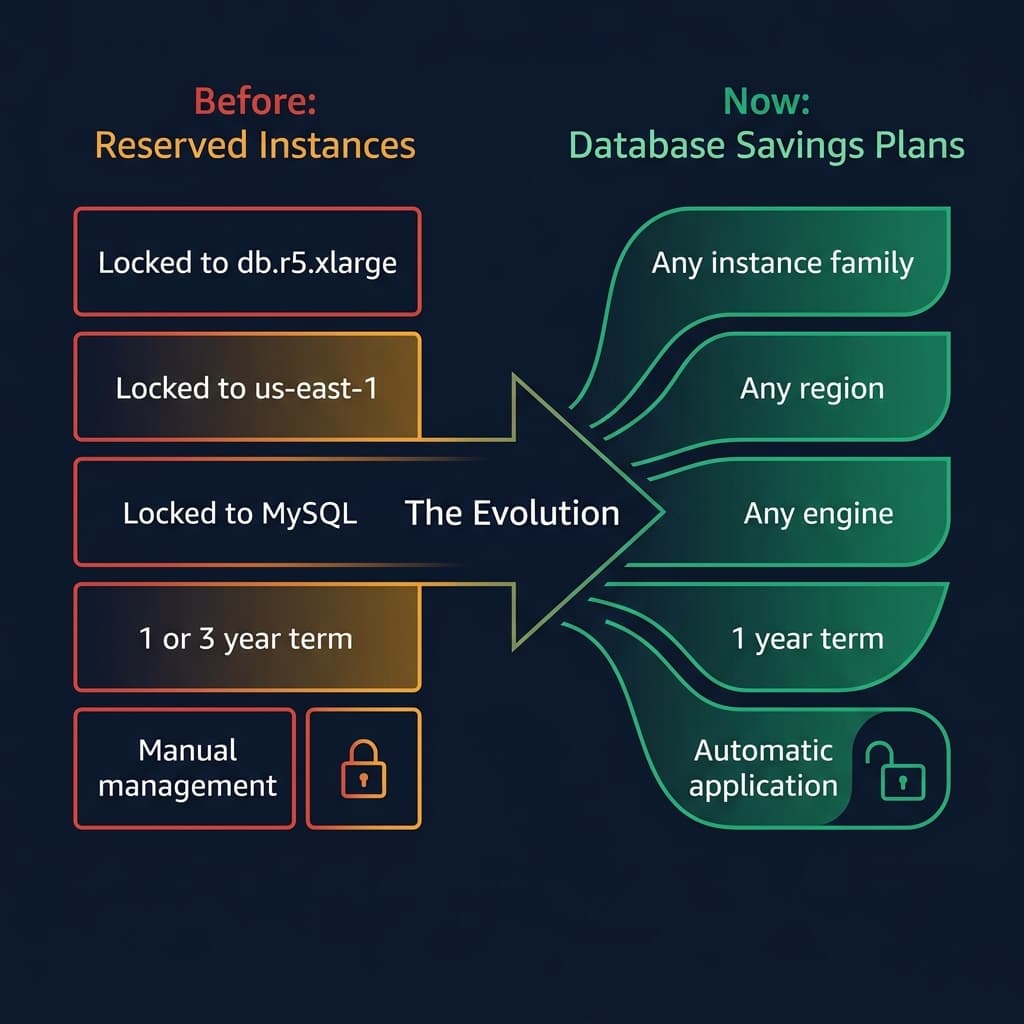
From rigid, locked-in reservations to flexible, spend-based commitments.
How Database Savings Plans Work
The mechanics are simple — and intentionally similar to Compute Savings Plans:
- Commit to a $/hr spend — You agree to spend, say, $5/hr on eligible database services for a 1-year term. This is your commitment — you pay it every hour regardless of actual usage.
- Get discounted rates automatically — Any usage of covered database services (RDS, Aurora, DynamoDB, etc.) is billed at the Database Savings Plan rate instead of On-Demand, up to your commitment amount.
- Overage goes to On-Demand — If your database spend exceeds $5/hr in any given hour, the overage is charged at normal On-Demand rates.
Database Savings Plans are currently 1-year term only with No Upfront payment only. This is simpler (fewer decisions), but it also means the maximum discount is lower than what you'd get with a 3-year, all-upfront Compute SP or RI. AWS may expand the options in the future.
Services Covered
This is where Database Savings Plans really shine. A single commitment covers all of the following:
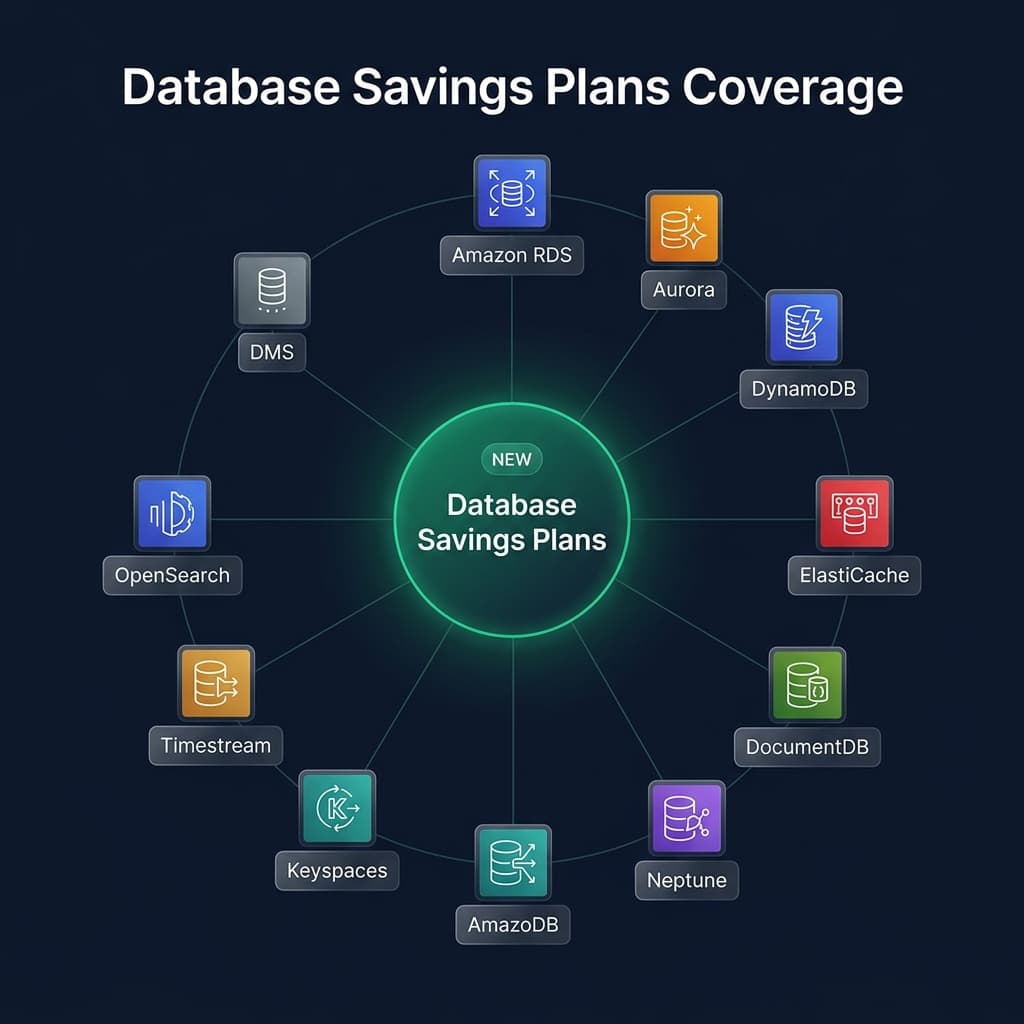
| Service | Coverage Details |
|---|---|
| Amazon RDS | All engines (MySQL, PostgreSQL, MariaDB, Oracle, SQL Server*) |
| Amazon Aurora | Provisioned instances + Aurora Serverless v2 + Aurora DSQL |
| Amazon DynamoDB | On-Demand + Provisioned capacity modes |
| Amazon ElastiCache | Valkey instances + ElastiCache for Valkey Serverless only** |
| Amazon DocumentDB | Instance-based + Serverless |
| Amazon Neptune | Instances + Serverless + Neptune Analytics |
| Amazon Keyspaces | Apache Cassandra compatible |
| Amazon Timestream | Provisioned + Serverless |
| Amazon OpenSearch | OpenSearch Service instances |
| AWS DMS | DMS instances + DMS Serverless |
* SQL Server and Windows Server licensing costs are billed separately at On-Demand rates.
** Redis and Memcached engines in ElastiCache are NOT covered — they still require Reserved Nodes.
Database Savings Plans generally apply to newer generation instances only (Generation 7+, e.g., db.r7g, db.m7g). If you're still running older generation instances (db.r5, db.m5), you may need to upgrade first to benefit. This is worth factoring into your migration plan.
Discount Tiers
The discount you get depends on the type of usage. Serverless deployments get the biggest discounts, while provisioned capacity gets smaller (but still meaningful) savings:
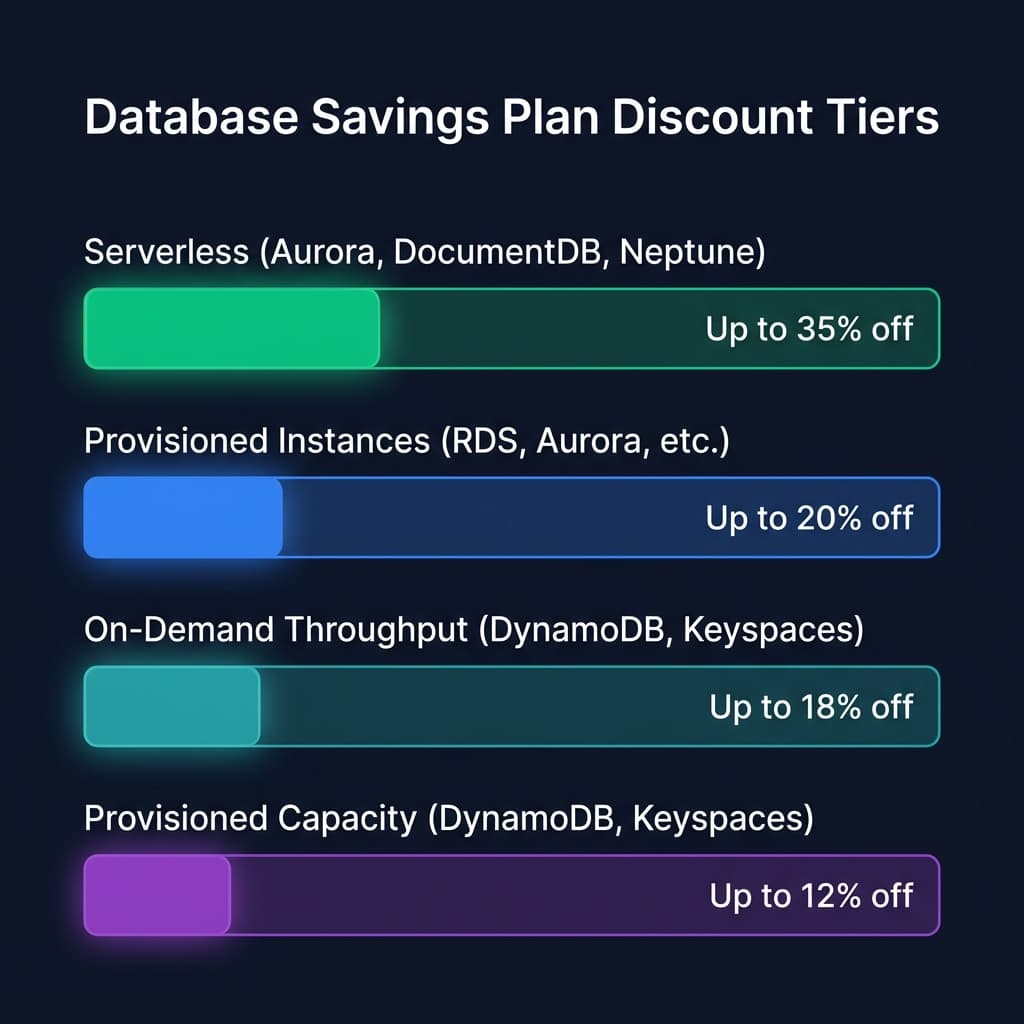
Discount rates vary by deployment type — serverless sees the biggest savings.
AWS is heavily incentivizing serverless adoption. The higher discount for serverless deployments (Aurora Serverless v2, DocumentDB Serverless, Neptune Serverless) encourages migration from provisioned instances — which is generally better for both cost optimization and operational simplicity.
Database Savings Plans vs Reserved Instances
| Criteria | Database Savings Plans | Reserved Instances |
|---|---|---|
| Commitment | $/hr spend level | Specific instance type + region + engine |
| Max Discount | Up to 35% | Up to 60–70% (3-year, all upfront) |
| Term Length | 1 year only | 1 or 3 years |
| Payment | No Upfront only | No, Partial, or All Upfront |
| Instance Flexibility | Any family, any size | Locked to specific family |
| Region Flexibility | Any region | Locked to one region |
| Engine Flexibility | Any engine | Locked to one engine |
| Services Covered | 10+ services | 1 service per RI type |
| Management | Automatic | Manual tracking required |
| Serverless Coverage | Yes | No |
Database Savings Plans offer less discount but dramatically more flexibility. For most workloads, the flexibility to change instance types, regions, and engines — plus the elimination of manual RI management — makes the smaller discount worth it. The exception is large, perfectly stable production databases where you're 100% confident the configuration won't change for 3 years — there, a 3-year RI may still win on raw cost.
The Fine Print
A few important details that aren't obvious at first glance:
- You cannot combine Database SP and RIs on the same workload. If an instance is already covered by an RI, the Database SP won't apply to it. You can, however, use both instruments for different workloads.
- ElastiCache coverage is limited to Valkey only. Standard Redis and Memcached workloads are NOT eligible. If you're running Redis on ElastiCache, Reserved Nodes are still your only discount option.
- Older instance generations may not be covered. Generally, Database SP applies to Gen 7+ instances. If you're on older families, upgrade first.
- SQL Server / Windows licensing is excluded. The compute discount applies, but licensing costs for BYOL or license-included SQL Server are billed at On-Demand rates separately.
- 1-year, No Upfront only. Unlike Compute SP (which offers 1 or 3 year terms with multiple payment options), Database SP is currently limited to a single configuration.
When to Buy a Database Savings Plan
✅ You run multiple database services across AWS
If you're using a mix of RDS, Aurora, DynamoDB, and other managed databases, a single Database SP covers them all. This is far simpler than purchasing separate RIs for each service.
✅ You're modernizing your database infrastructure
Migrating from RDS to Aurora? Upgrading instance families from r5 to r7g? Switching from MySQL to PostgreSQL? With RIs, each of these changes would strand your reservation. Database SP doesn't care — the discount follows your spend, not your configuration.
✅ You're moving to serverless databases
Aurora Serverless v2, DocumentDB Serverless, and Neptune Serverless get the highest discount tier (up to 35%). If you're adopting serverless databases, a Database SP is a no-brainer — RIs don't even cover serverless deployments.
✅ You want to simplify cost management
No more tracking which RIs are utilized, which are expiring, which need to be re-purchased for a different instance type. One commitment, automatic application, done.
✅ Your database spend is stable or growing
Same principle as Compute Savings Plans — if your baseline database spend is predictable, commit to it and save.
When NOT to Buy a Database Savings Plan
❌ You need maximum possible discount and your config is stable
If you're running a large production Aurora cluster on db.r7g.4xlarge in us-east-1 and you're 100% confident it won't change for 3 years, a 3-year All Upfront RI will give you up to 60–70% off — far exceeding the ~20% you'd get from a Database SP on provisioned instances.
❌ You primarily use ElastiCache with Redis or Memcached
Database SP only covers ElastiCache for Valkey. If your caching layer runs on Redis or Memcached, Reserved Nodes are still the only discount option.
❌ You're running older instance generations
If your databases are on Gen 5 or Gen 6 instances and you're not planning to upgrade soon, the Database SP may not apply to your workload. Check eligibility before purchasing.
❌ Your database spend is declining
If you're consolidating databases, migrating off AWS, or reducing infrastructure, you'll pay the commitment hourly regardless. Same rule as Compute SP — don't commit to spend that's going away.
❌ You're migrating databases off AWS
Moving to self-hosted PostgreSQL, a different cloud provider, or a third-party managed service? The commitment is non-cancellable and non-transferable.
Many organizations use both: Database Savings Plans for flexible, evolving workloads (dev/staging, multi-engine, serverless adoption) and Reserved Instances for rock-solid, unchanging production databases where the deeper 3-year discount is worth the rigidity.
Getting Started
- Check your database spend — In AWS Cost Explorer, filter by service to see your RDS, Aurora, DynamoDB, and other database costs. Identify your baseline hourly spend.
- Use the Purchase Analyzer — Navigate to the Savings Plans console. AWS provides recommendations based on your historical usage.
- Check instance generations — Ensure your databases are running Gen 7+ instances. Upgrade if needed to maximize coverage.
- Size conservatively — Commit to your minimum baseline, not your average or peak. You pay the commitment every hour regardless of usage.
- Purchase and monitor — Buy the Database SP, then track utilization in Cost Explorer. If utilization is consistently at 100%, consider adding more commitment.
Explore Cloud Instance Pricing
Use CloudBench to compare On-Demand and Spot pricing across AWS instances and regions. Understand your compute costs before committing to a savings plan.
View Instance Pricing →