AWS Savings Plans: The Discount Pricing Menu for Your Cloud
Think of It Like a Restaurant
Imagine you eat at the same restaurant every day. Normally, you order off the regular menu — full price, no commitments, pay what you eat. That's On-Demand pricing in AWS.
Now, the restaurant offers you a deal: “Commit to spending at least $10 per hour with us, and we'll give you access to a special pricing menu where everything is 30–60% cheaper.”
That's exactly what an AWS Savings Plan is. You commit to a consistent amount of compute spending (measured in $/hour), and in return, AWS gives you a deeply discounted price sheet for your instances.
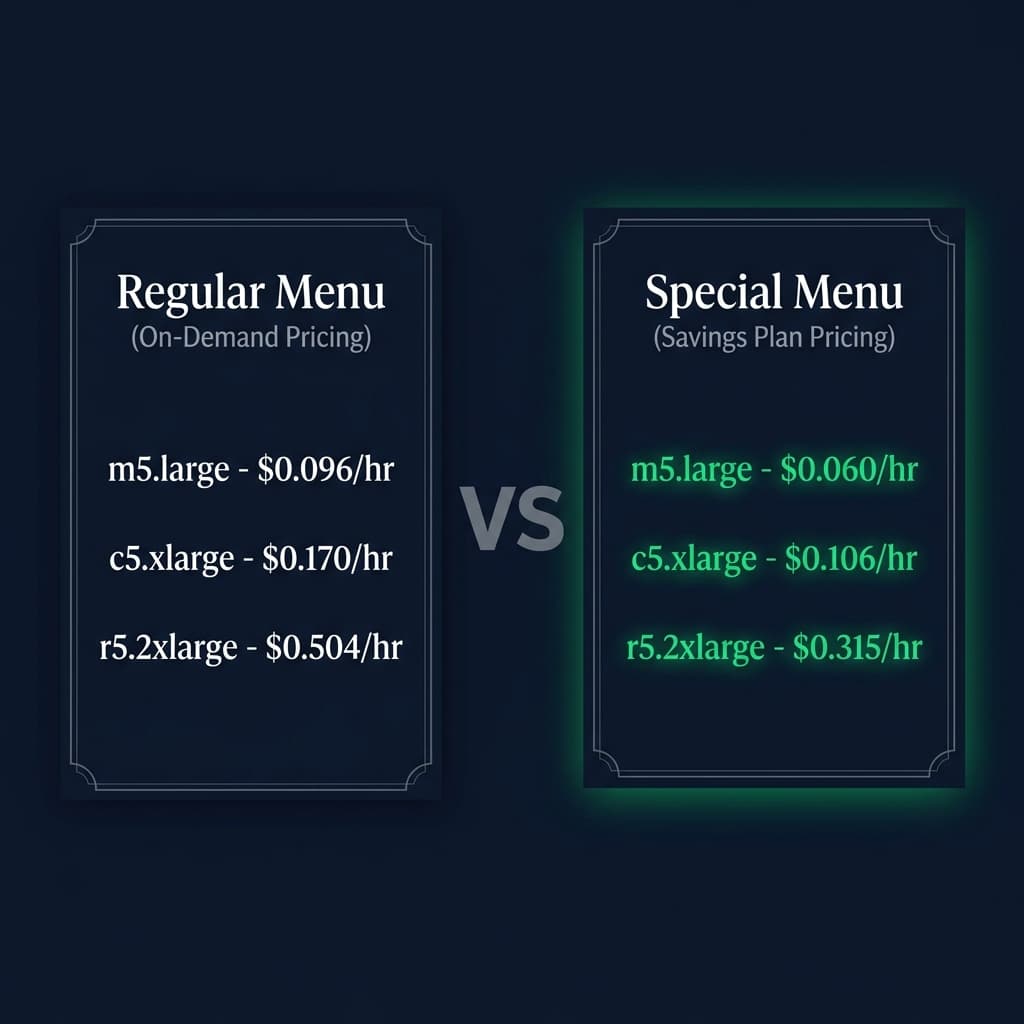
On-Demand is the regular menu. Savings Plans unlock the special pricing menu.
How Savings Plans Actually Work
Here's the core mechanic in three steps:
- You make a commitment — You agree to spend a fixed dollar amount per hour (e.g., $10/hr) for either 1 or 3 years. This is your commitment. You pay it regardless of usage.
- You get the special pricing menu — As long as your usage falls within that committed amount, every instance you run is billed at the Savings Plan rate, which can be 30–72% less than On-Demand.
- Anything beyond the commitment? Regular menu. — If your usage in any given hour exceeds your $10/hr commitment, the overage is charged at the standard On-Demand rate. You're back to the regular menu for those extra resources.
The commitment is on dollars per hour, not on specific instances. You're not locking yourself into running a specific server — you're committing to a spending level. This gives you much more flexibility than traditional Reserved Instances.
Three Types of Savings Plans
AWS offers three flavors, each trading flexibility for bigger discounts:
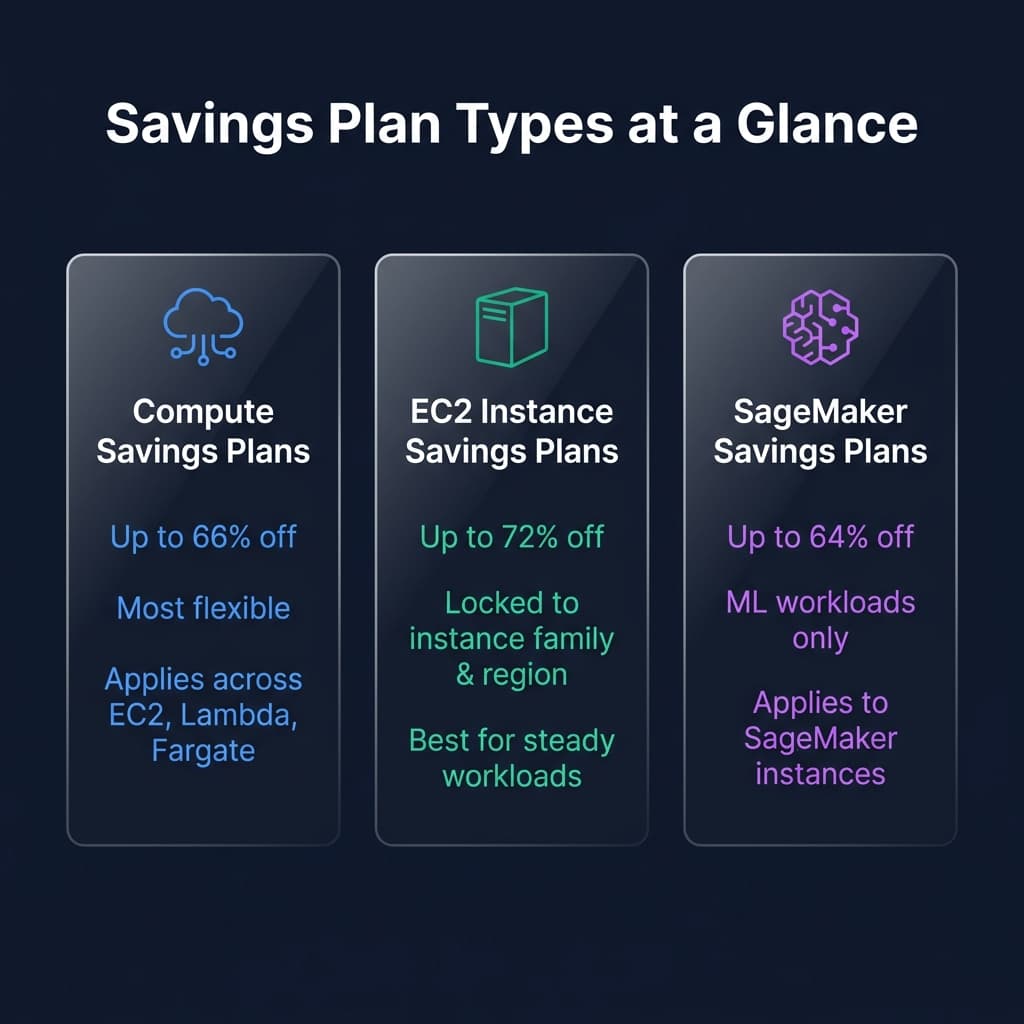
More flexibility = slightly smaller discount. More lock-in = bigger discount.
| Feature | Compute SP | EC2 Instance SP | SageMaker SP |
|---|---|---|---|
| Max Discount | Up to 66% | Up to 72% | Up to 64% |
| Instance Family Lock | ✗ Any family | ✓ Locked | N/A |
| Region Lock | ✗ Any region | ✓ Locked | ✗ Any region |
| OS Flexibility | ✓ Any OS | ✓ Any OS | N/A |
| Applies To | EC2, Lambda, Fargate | EC2 only | SageMaker only |
| Best For | Dynamic workloads | Steady baseline | ML pipelines |
Compute Savings Plans are the safest bet for most organizations. You keep the flexibility to change instance types, regions, and even shift workloads to Lambda or Fargate — and still get major savings. Only choose EC2 Instance SP if you're very confident your workload won't move.
The Commitment Threshold Explained
This is the most important concept to internalize: your commitment is a threshold line. Everything below it is discounted. Everything above it is On-Demand.
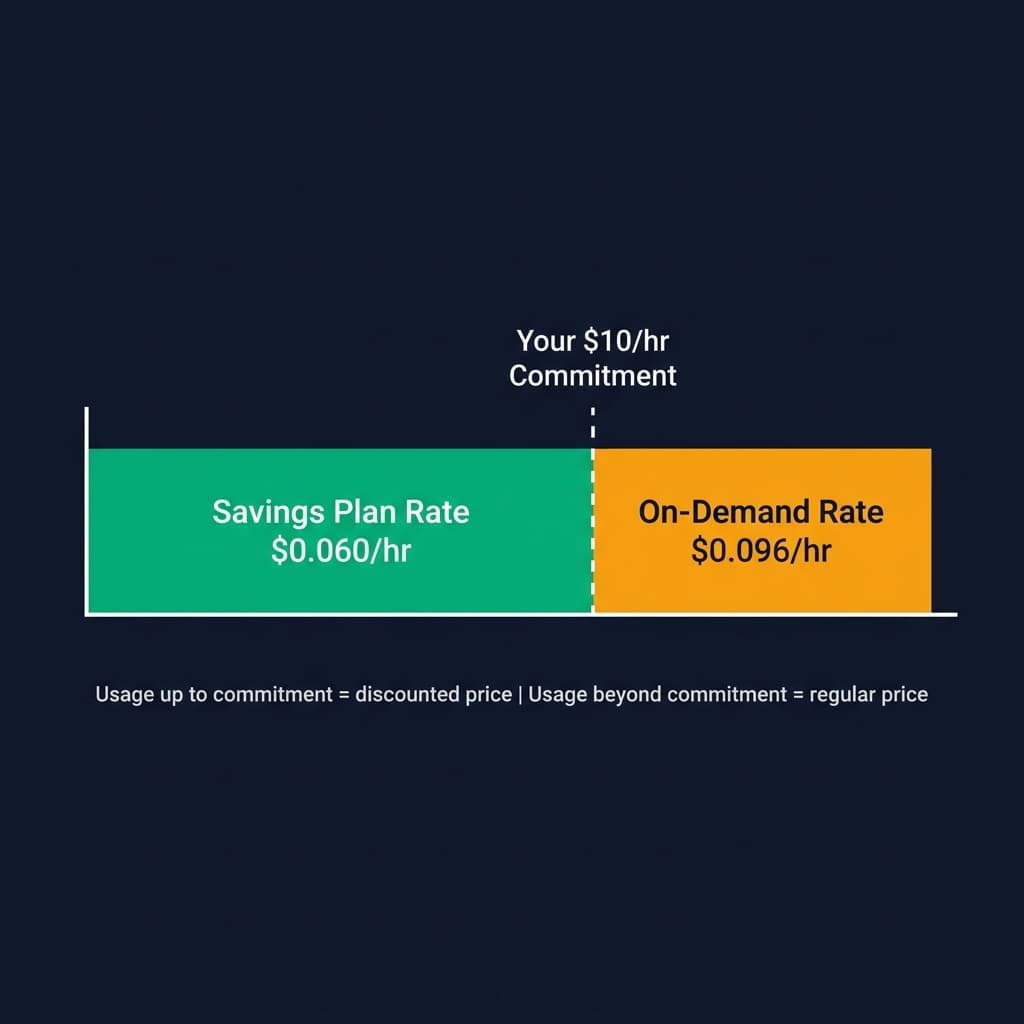
Usage up to your commitment = Savings Plan rate. Usage beyond = On-Demand rate.
Let's say you commit to $10/hr:
- Hour where you use $8 worth of compute → All $8 is billed at the discounted Savings Plan rate. You still pay the $10/hr commitment (unused $2 is lost).
- Hour where you use $10 worth of compute → Perfect! Every dollar is covered by the special pricing menu. Maximum savings.
- Hour where you use $15 worth of compute → The first $10 is billed at Savings Plan rates. The remaining $5 of usage is billed at the regular On-Demand rate.
You pay the commitment amount every hour of every day for the full term (1 or 3 years) — whether you use it or not. This is the “restaurant membership fee.” Size your commitment based on your minimum baseline usage, not your peaks.
Real-World Savings Example
Let's walk through a concrete scenario. Say you run a steady baseline of EC2 instances in us-east-1:
🧮 Without Savings Plans (On-Demand)
✅ With Compute Savings Plan (1-Year, No Upfront)
With a 3-year commitment and partial upfront payment, discounts can reach up to 72% — potentially saving over $9,500/year on this same workload.
Savings Plans vs Reserved Instances
If you've used AWS before, you might know about Reserved Instances (RIs). Savings Plans were introduced as a simpler, more flexible alternative. Here's how they compare:
| Criteria | Savings Plans | Reserved Instances |
|---|---|---|
| Commitment | $/hr spend | Specific instance config |
| Flexibility | Change instance types, sizes, OS, regions* | Locked to specific config |
| Max Discount | Up to 72% | Up to 72% |
| Applies To | EC2 + Lambda + Fargate | EC2 only (or RDS, etc.) |
| Management | Automatic — AWS applies best rate | Manual capacity management |
| Marketplace Resale | Not resellable | Can sell unused RIs |
* Region flexibility applies to Compute Savings Plans only. EC2 Instance Savings Plans are region-locked.
For most organizations, Savings Plans are strictly better than RIs. Same discounts, way more flexibility, and AWS automatically applies the best rate. The only reason to consider RIs is if you need to resell unused capacity on the marketplace.
When to Buy a Savings Plan
✅ Your compute usage will stay the same or grow
This is the sweet spot. If your infrastructure is stable or scaling up, a Savings Plan is almost always a win. You're locking in today's discounted rate on usage that's guaranteed to exist tomorrow. Growing workloads benefit the most — your commitment covers the baseline, and any growth above it simply bills at On-Demand until you purchase additional commitment.
✅ You have a predictable baseline — even if there are spikes
You don't need perfectly flat usage. As long as you have a consistent floor of compute (e.g., your production servers, databases, always-on services), size your Savings Plan to that floor. Let the peaks ride On-Demand or Spot.
✅ You're consolidating from Reserved Instances
If you're already using RIs, Savings Plans offer the same discounts with dramatically less management overhead. As your RIs expire, replacing them with Savings Plans is a no-brainer — you get equal or better pricing plus the flexibility to change instance types without re-purchasing.
✅ You use a mix of EC2, Lambda, and Fargate
Compute Savings Plans apply across all three services. If your architecture spans traditional VMs, serverless functions, and containers, a single Savings Plan covers them all. RIs can't do this.
Here's something many people don't realize: you don't need to use a Savings Plan for the full term to come out ahead. With a typical 1-year No Upfront Compute SP offering ~37% savings, your breakeven point is roughly 7–9 months. That means even if your usage drops to zero after month 9, you've still saved money compared to paying On-Demand for those 9 months. The math works in your favor more often than you'd think — run the numbers for your specific workload before assuming a commitment is too risky.
When NOT to Buy a Savings Plan
❌ Your compute usage is going to decrease
If you know your usage will shrink during the commitment period — maybe you're decommissioning legacy systems, consolidating servers, or your product is sunsetting — a Savings Plan will leave you paying for capacity you're not using. Remember: you pay the commitment every hour regardless of usage. If 6 months from now you'll be running half the infrastructure, you'll be overpaying for the back half of the term.
❌ You're actively optimizing or right-sizing
If you're in the middle of an infrastructure optimization initiative — right-sizing over-provisioned instances, deleting idle resources, improving auto-scaling — hold off on the Savings Plan. Get to your new steady state first, then commit. Otherwise, you'll lock in a commitment based on your bloated pre-optimization usage and waste money once you've trimmed the fat.
❌ You're migrating to managed services not covered by Savings Plans
Moving from self-managed EC2 instances to managed platforms like RDS, Aurora, ElastiCache, OpenSearch, or EKS with Fargate? Be careful. While Compute Savings Plans cover EC2, Lambda, and Fargate, they do not cover RDS, Aurora, Redshift, or most other managed services. If your migration plan will shift spending away from covered services, your Savings Plan utilization will tank.
❌ Your workloads are primarily Spot-eligible
If your compute is mostly batch processing, CI/CD, data pipelines, or other interruptible work, Spot Instances can offer up to 90% off On-Demand — far exceeding Savings Plan discounts. Don't commit to a Savings Plan for workloads that could run on Spot at a fraction of the cost. Use CloudBench to compare Spot vs On-Demand pricing for your instance types.
❌ You're a fast-moving startup with uncertain infrastructure needs
Early-stage companies often pivot architectures rapidly — switching cloud providers, rearchitecting to serverless, or scaling from zero to massive and back. A 1 or 3-year commitment doesn't pair well with that level of change. Wait until your infrastructure stabilizes before locking in.
❌ You're planning a multi-cloud or cloud-exit strategy
If there's a realistic chance you'll move workloads off AWS — whether to GCP, Azure, on-prem, or a hybrid setup — committing to an AWS-only pricing contract doesn't make sense. The commitment is non-cancellable and non-transferable.
The best strategy? Layer your discounts. Use Savings Plans for your steady baseline, Spot Instances for interruptible batch work, and On-Demand for unpredictable spikes. Use CloudBench to compare On-Demand vs Spot pricing across instances and regions to find the optimal mix.
Getting Started with Savings Plans
- Analyze your usage — Check AWS Cost Explorer's Savings Plans recommendations. It analyzes your past 7–60 days of usage and suggests the optimal commitment level.
- Choose your plan type — Compute SP for flexibility, EC2 Instance SP for max savings on predictable workloads.
- Pick your term & payment — 1-year or 3-year commitment. No upfront, partial upfront, or all upfront (more upfront = bigger discount).
- Purchase via Console or CLI — Navigate to the Savings Plans dashboard in AWS Console, or use the AWS CLI.
- Monitor & optimize — Track utilization in Cost Explorer. If your SP is consistently underutilized, your commitment may be too high.
Ready to Find Your Savings?
Use CloudBench to compare On-Demand and Spot pricing across AWS instances and regions. See exactly where Savings Plans can cut your bill.
Explore Instance Pricing →